1. Left Obsidian Navigation Rail (All 17 Studio Icons)
▶
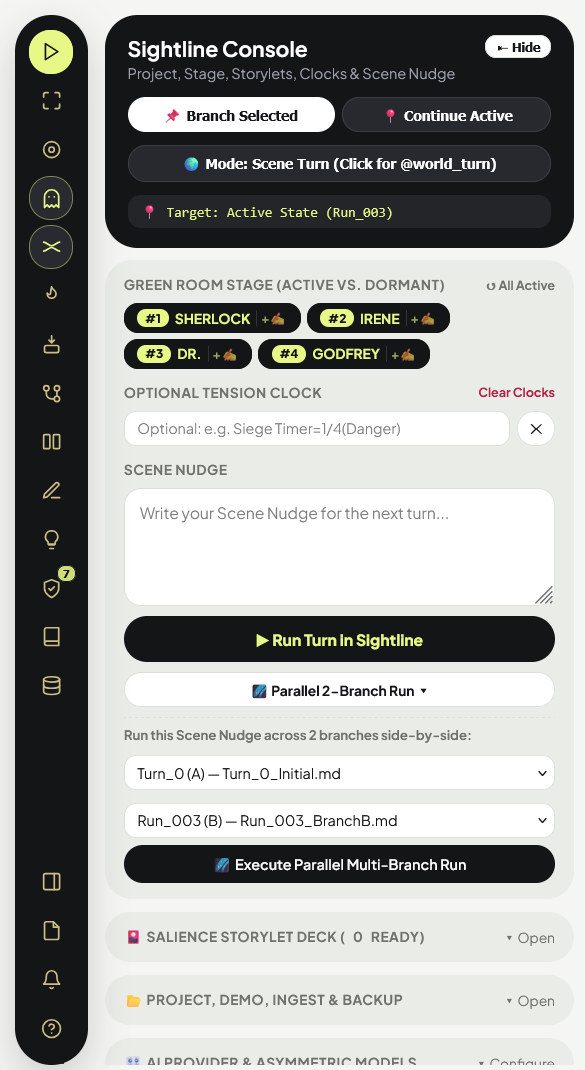
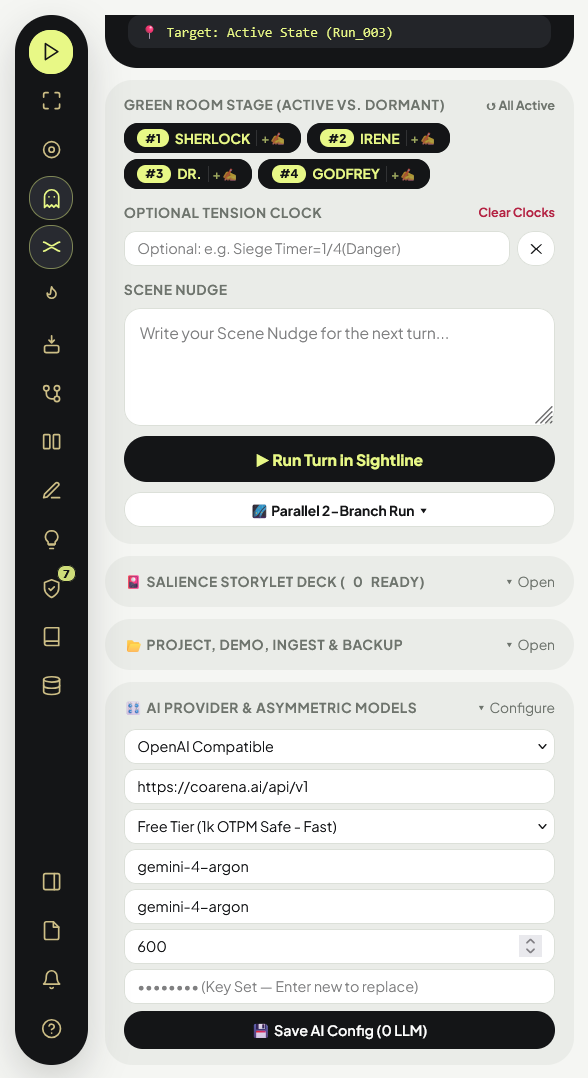
Sightline Console: Opens the left command drawer for Green Room staging, Storylet Deck, Tension Clocks, Parallel 2-Branch Runs, Demo/Synopsis Ingest, and AI Config.
⛶
Fit Entire Flowchart: Auto-centers and scales the canvas so all state columns, branches, and Floating Beats fit on screen.
◎
Jump to Active State: Pans and zooms directly to the Acid-Lime
YOU ARE HERE state card.◌
Toggle Untouched Ghost Branches: Hides/shows unvisited alternate branches (
Branch B/C). Any branch you load, edit, or merge is permanently promoted to a solid card.≈
Toggle Character Swimlanes: Shows/hides colored cubic-Bézier character progression threads across states.
🔥
Todorov Pacing Heatmap PRO: Color-codes every State Card by its
0–100 Dramatic Tension Score (Cold Indigo, Rising Emerald, Hot Amber, Climax Crimson).📌
Floating Idea Nodes & Reverse-Causal Solver PRO: Pin untethered future destination beats onto the canvas and compute 3 legal causal pathways from your current state.
⑂
3-Way Branch Merger & Meereenese Knot: Combine two timeline branches with per-character cherry-picking and arrival-order cover advantages.
⚖️
Side-by-Side Epistemic Diff Matrix PRO: Compare any two State Cards (
Canon vs. Ghost) side-by-side across locations, items, secrets, blind spots, and trust edges.✎
SIGHTLINE Manuscript Studio PRO: Disk-backed
/Manuscript prose editor with Zen Mode, Fair-Play Reader Ledger, Leak Scanner, Retro-Con Sync, and .fountain / .ink / .yarn / .doc exporters.💡
Story Insights & Voice Cadence Meter PRO: Audits Moral/Thematic Drift, surfaces Hidden-Gem Ghost Branches, profiles Director Instincts, and checks Voice Cadence / Flanderization.
🛡️
Continuity Linter & Micro-Chronology PRO: Audits Chekhov's Guns, Blind Spots, Sanderson MICE Threads, Revision Ripples, and Stuart Turton's Character × Time Timetable.
▤
World Bible Lorebook: Add, edit, or delete deterministic Aho-Corasick lore entries in
World_Bible.md.◈
CoALA Episodic Archive: Inspect compacted historical clauses, salience scores, and negative constraints in
Episodic_Archive.json.◫
Toggle Sightline Inspector: Collapses/expands the Right Inspector panel for full-screen canvas space.
≡
View Raw Markdown: Inspect and copy the raw
.md state file for the selected card.2. Sightline Console, Storylet Deck, Parallel Run & Auto-Ingest
WHATGreen Room Stage, Tension Clocks & Parallel 2-Branch Runner
WHENUse
📌 Branch Selected to branch from any clicked card, or 📍 Continue Active to advance from YOU ARE HERE. Toggle 🌍 Mode: @world_turn between chapters to advance off-screen factions in 1 GM call.HOW
• Green Room Stage: Click character chips to toggle them between the Active Stage (
• 🌌 Parallel 2-Branch Run PRO: Click
#1, #2, #3) and the Dormant Green Room (💤). Dormant characters consume 0 tokens and are sliced out of active prompts so active characters never get meta-spoilers.• 🌌 Parallel 2-Branch Run PRO: Click
🌌 Parallel 2-Branch Run ▾ below the Run button, pick any two timeline states, and click Execute Parallel Multi-Branch Run to test your Scene Nudge across both timelines side-by-side!
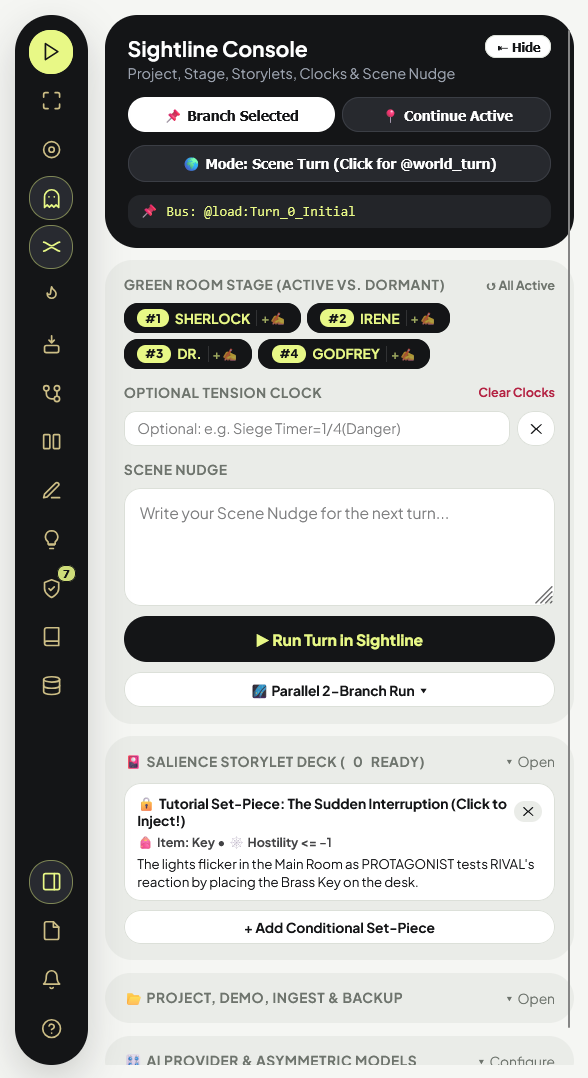
PRO🎴 Salience Storylet Deck, 🎬 Demo Loader, ⚡ Auto-Ingest & 📦 .zip / Time-Capsule
HOW
• 🎴 Salience Storylet Deck: Open
• 🎬 Load Demo & ⚡ Auto-Ingest: Open
• 📦 Export .zip & 🕰️ Time-Capsule: Click
🎴 Salience Storylet Deck to pre-write dramatic set-pieces with optional Location, Item, or Clock prerequisites. When the current state satisfies a card's prerequisites, it glows in Acid-Lime (⚡ Ready)—click it to inject its Scene Nudge into the Console!• 🎬 Load Demo & ⚡ Auto-Ingest: Open
📂 Project, Demo, Ingest & Backup. Click 🎬 Load Demo: The Obsidian Express (0 LLM) to scaffold a complete playable mystery in 0.0s, or click ⚡ Auto-Ingest Synopsis / Chapter (1 GM) to paste raw story text and automatically generate Turn_0_Initial.md, World_Bible.md, and Voice_Anchors.md!• 📦 Export .zip & 🕰️ Time-Capsule: Click
📦 Export .zip to download a timestamped archive of your entire project, or 🕰️ Time-Capsule to export a read-only interactive HTML storyboard to share with editors.
3. The Rashomon Reality Lens, Artifact Provenance & Todorov Pacing Heatmap
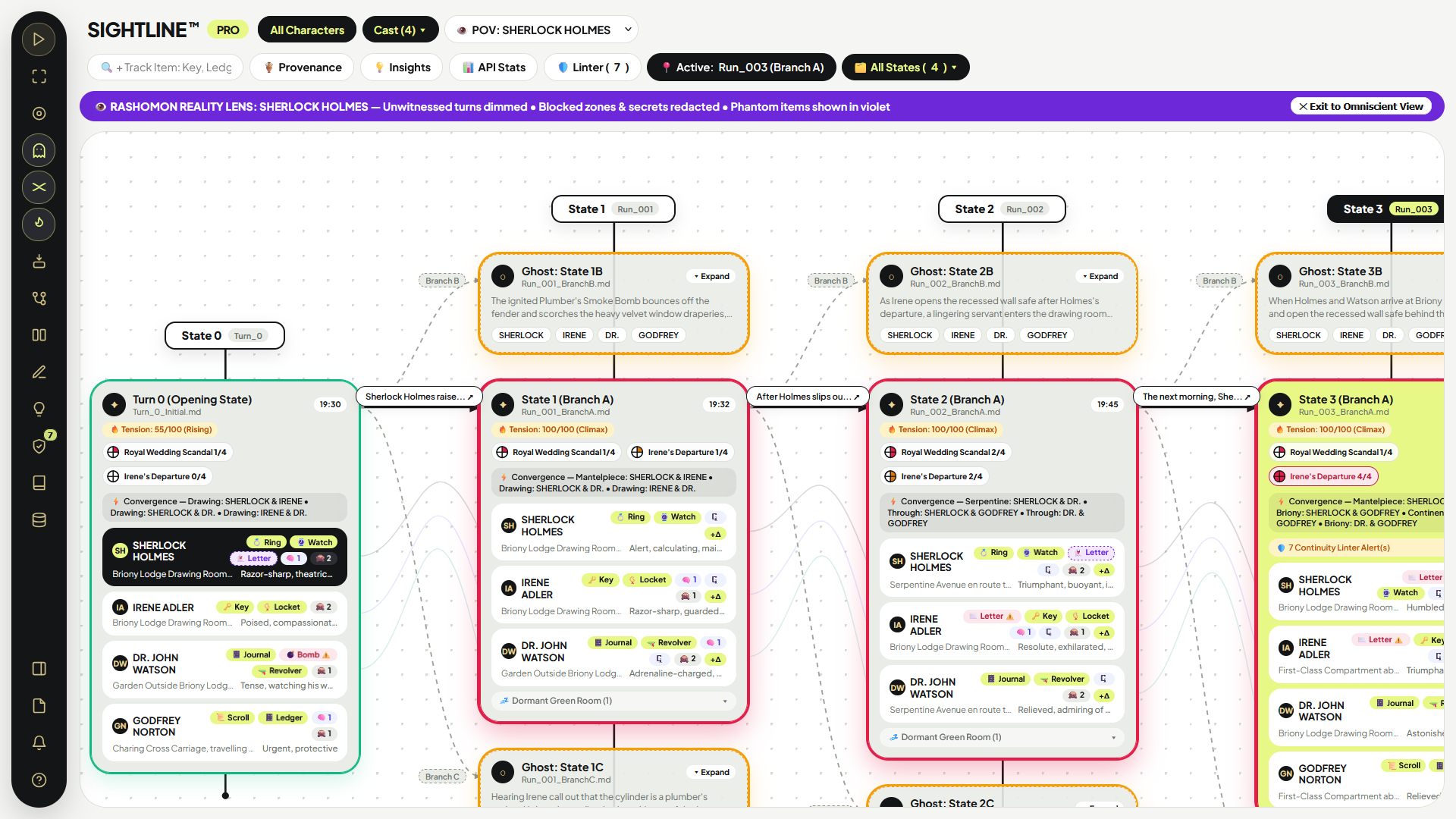
PRO👁️ The Rashomon Filter / Holographic POV Sandbox (
👁️ Lens: Omniscient ▾ in Top Bar)WHENUse when writing a single-POV chapter or auditing whether a character has enough information to deduce a plot twist.
HOWSelect any character (e.g.
1. Unwitnessed Turn Dimming: Any state card where that character was
2. 2D Stage Map Redaction: Characters in
3. 👻 Violet Phantom Artifact Pills: If someone stole an item from the character without their knowledge (recorded in their
4. Inspector Mind-Shield: Clicking any other character redacts their Private Knowledge and Core Motivation so you only see what your POV character knows. Click
👁️ POV: VICTOR KANE) from the Top Bar dropdown. In 0.0s (0 LLM Calls), the entire studio filters into that character's subjective reality:1. Unwitnessed Turn Dimming: Any state card where that character was
💤 Dormant dims to grayscale.2. 2D Stage Map Redaction: Characters in
✕ Blocked zones or concealed behind cover become ? UNKNOWN on the 2D Stage Map.3. 👻 Violet Phantom Artifact Pills: If someone stole an item from the character without their knowledge (recorded in their
🙈 Blind Spots), a dashed violet pill (👻 Key) appears on their row showing they still falsely believe they hold it!4. Inspector Mind-Shield: Clicking any other character redacts their Private Knowledge and Core Motivation so you only see what your POV character knows. Click
✕ Exit to Omniscient View on the violet banner to return.
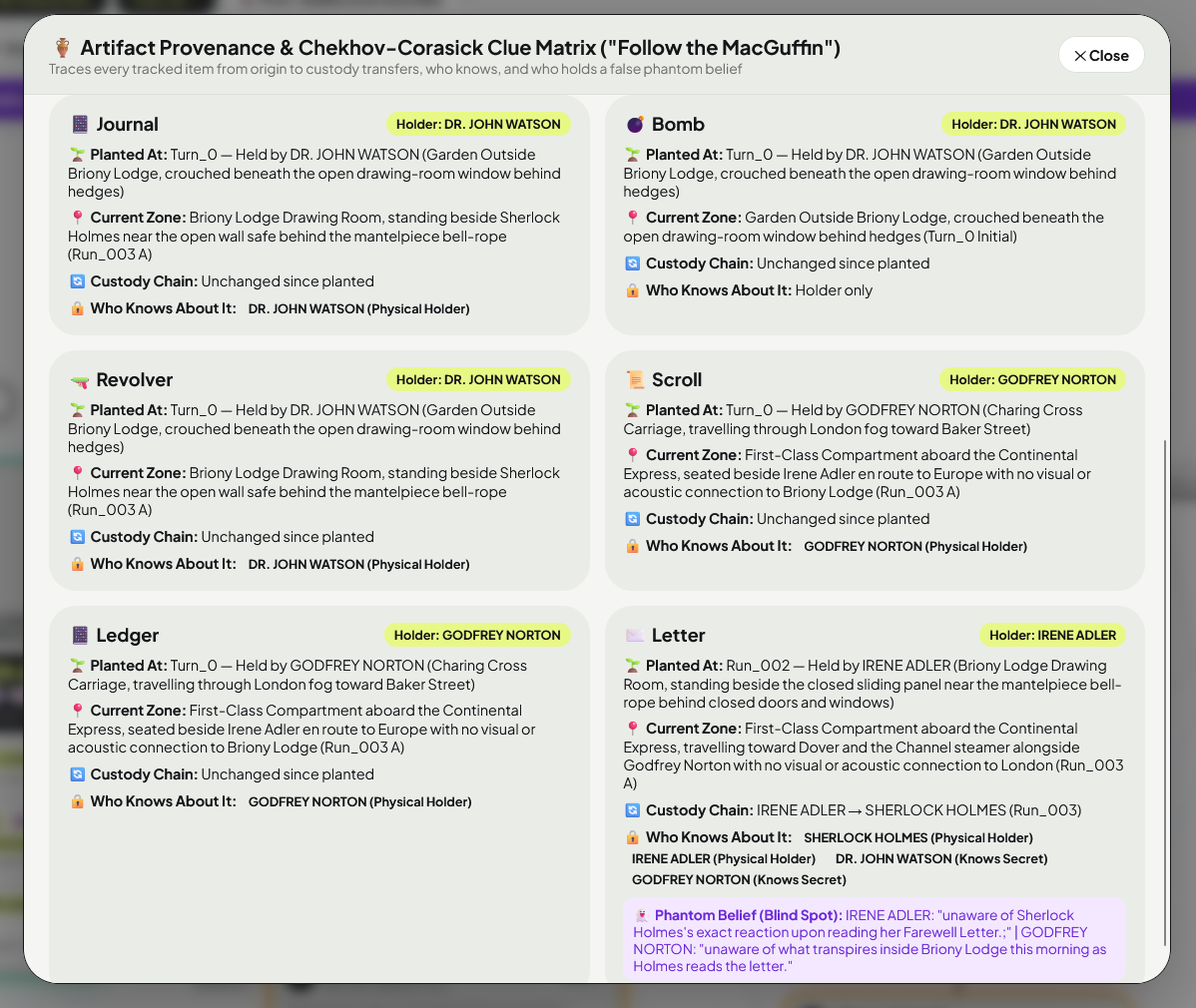
PRO🏺 Artifact Provenance & Clue Matrix (
🏺 Provenance Button) + 🔥 Todorov Pacing Heatmap (🔥 Rail Icon)HOW
• 🏺 Artifact Provenance ("Follow the MacGuffin"): Click
• 🔥 Todorov Pacing Heatmap: Click the
🏺 Provenance in the Top Bar (or click any item pill like 🗝️ Key or 📔 Ledger on a character row) to trace that item across the entire story tree: where it was planted on Turn 0, every custody transfer between characters, its current zone, who secretly knows where it is, and who holds a 👻 Phantom Belief about it.• 🔥 Todorov Pacing Heatmap: Click the
🔥 flame icon on the Left Rail to highlight every State Card with its 0–100 Dramatic Tension Score (computed from state deltas, clock fill ratios, hostility swings, and room convergences) so you can spot "Cold" pacing lulls vs. "Climax" spikes across your act structure.
4. 3-Way Branch Merger ("Meereenese Knot") & Diff Matrix
WHAT3-Way Timeline Convergence & George R.R. Martin Arrival Order (
⑂ Icon)HOW
1. Step 1A & 1B: Select Primary Timeline (Branch 1) and Secondary Timeline (Branch 2).
2. Step 1C (Meereenese Knot Arrival Order — PRO): Choose
3. Step 2 & 3: Cherry-pick which branch wins per character (or click
2. Step 1C (Meereenese Knot Arrival Order — PRO): Choose
⚡ Simultaneous Arrival, 🥇 Branch 1 Arrives First, or 🥈 Branch 2 Arrives First. SIGHTLINE automatically stamps who secured initial room cover and sightline advantage into Global World Facts!3. Step 2 & 3: Cherry-pick which branch wins per character (or click
Synthesize Knowledge & Items) and click 💾 Save Merged State Card Only (0 LLM Calls).
PRO⚖️ Side-by-Side "Ghost vs. Canon" Epistemic Diff Matrix (
⚖️ Rail Icon)HOWClick
⚖️ on the Left Rail (or ⚖️ Diff Matrix in the Right Inspector) and choose any two State Cards in the left and right dropdowns to compare their exact Outcome Summaries, Tension Clocks, Locations, Inventories, Secret counts, Blind Spot counts, and Trust/Fear scores in a highlighted side-by-side table.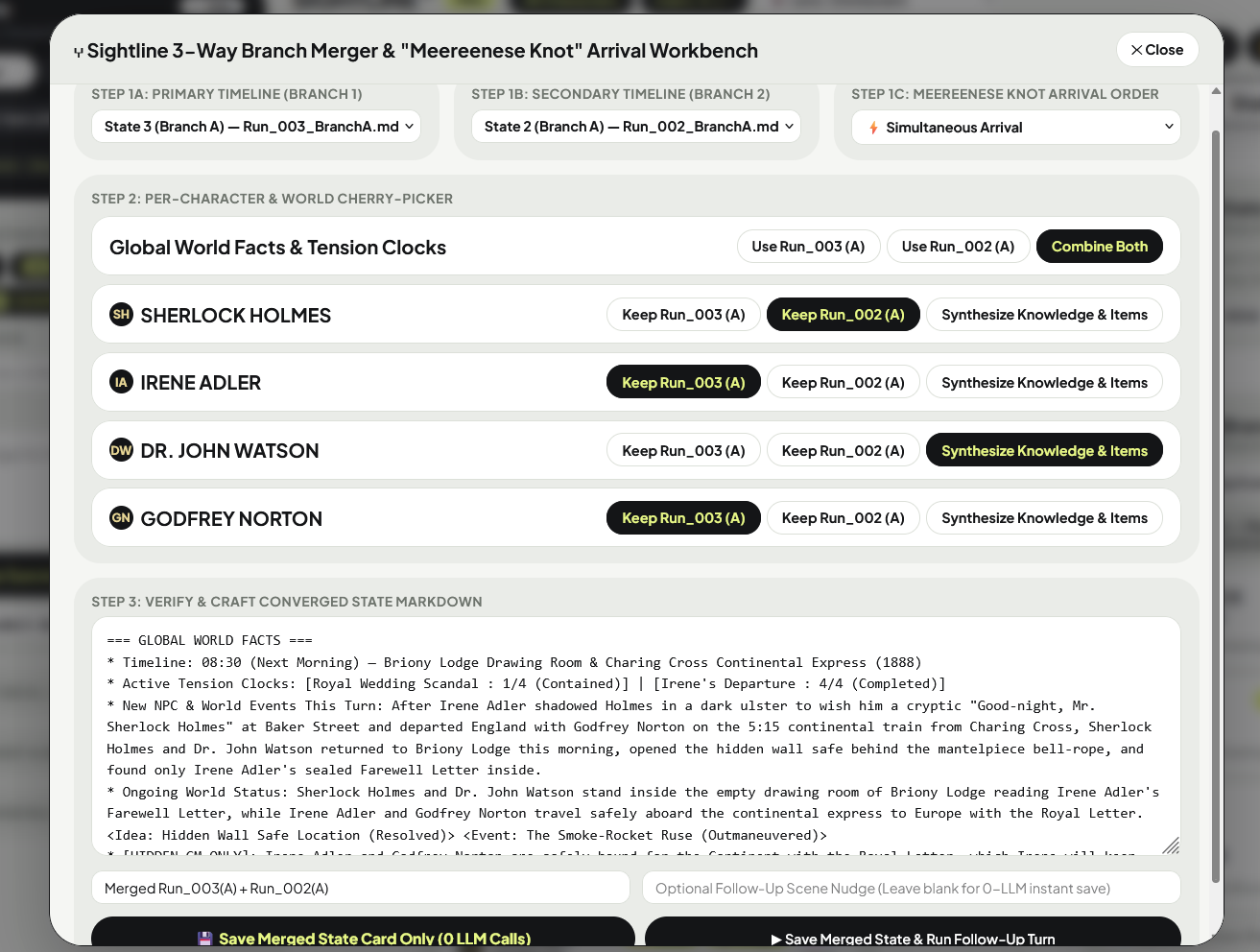
5. SIGHTLINE Manuscript Studio, Fair-Play Ledger & Exporters
PRODisk-Backed
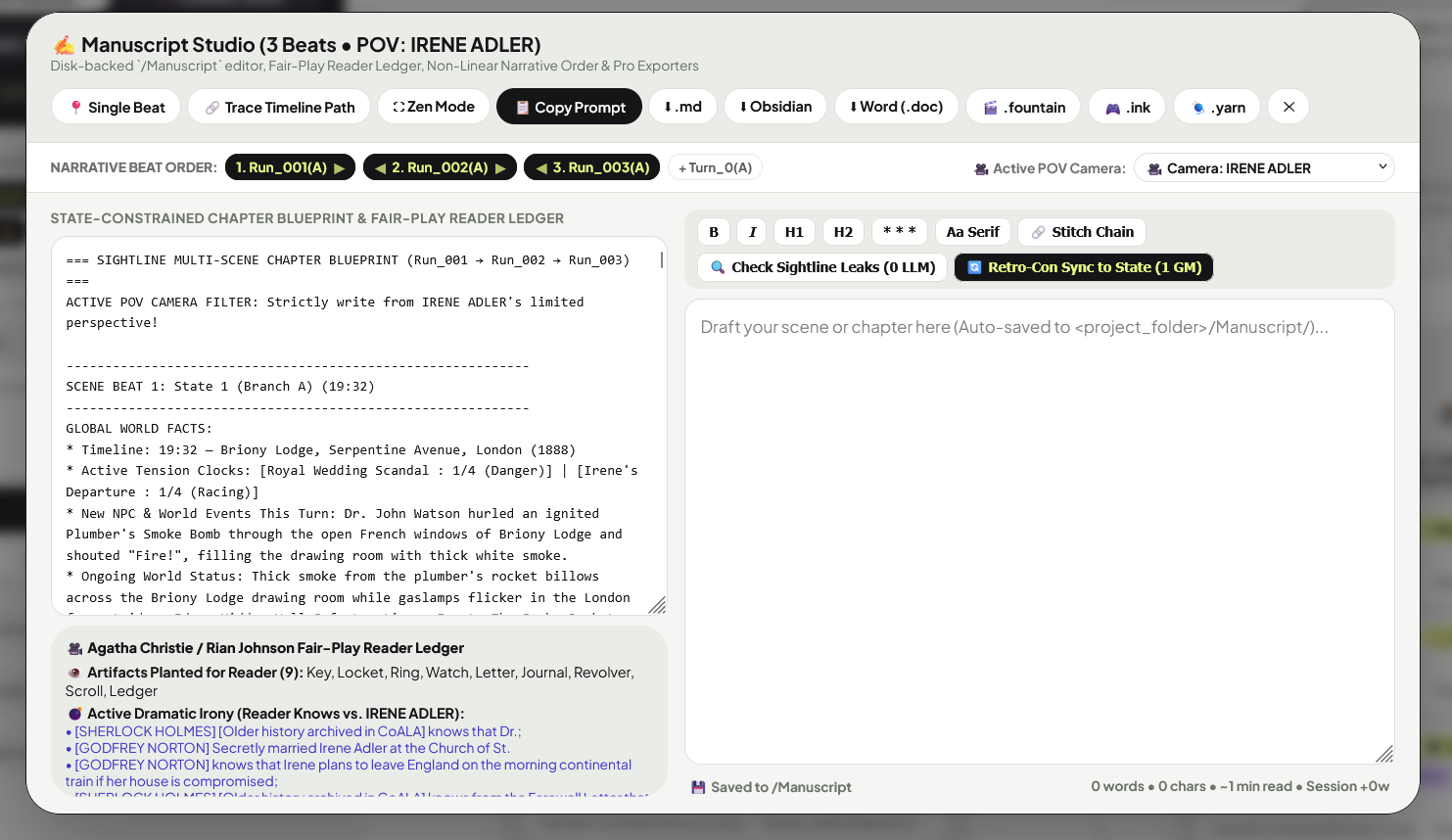
/Manuscript Editor, Zen Mode, Leak Scanner & Retro-Con Sync (✎ Icon)HOW
• Auto-Saved Disk Drafts & Formatting Toolbar: Every scene draft you write automatically saves to
• 🔍 Check Sightline Leaks (
• 🔄 Retro-Con Sync to State (
<project_folder>/Manuscript/Scene_<node_id>.md on your hard drive. Use the toolbar for Bold, Italic, H1/H2, * * * Scene Breaks, Aa Serif book typography, and ⛶ Zen Mode full-screen writing while tracking live word count, reading time, and session progress.• 🔍 Check Sightline Leaks (
0 LLM): Scans your drafted prose against the active POV character's 🙈 Blind Spots and warns you in crimson if your draft accidentally mentions an item or secret the character doesn't know!• 🔄 Retro-Con Sync to State (
1 GM Call): Improvised a new detail while writing prose (e.g., a character dropped their key or revealed a secret)? Click 🔄 Retro-Con Sync to State to extract those changes from your prose and patch them back into the State Card in 1 click!
PRO🎥 Fair-Play Reader Ledger, ◀/▶ Non-Linear Order & 🎬 Pro Exporters
HOW
• 🎥 Active POV Camera & Fair-Play Reader Ledger: Select a character in
• ◀ / ▶ Non-Linear Narrative Order: Click
• 1-Click Exporters: Export to
🎥 Active POV Camera to filter the blueprint to their perspective and view the Agatha Christie / Rian Johnson Fair-Play Ledger—showing planted artifacts, active dramatic irony (Reader Knows vs. POV Knows), and flagging any unplanted Deus Ex Machina items.• ◀ / ▶ Non-Linear Narrative Order: Click
🔗 Trace Timeline Path, then use the ◀ and ▶ arrows on any beat pill in the NARRATIVE BEAT ORDER bar to arrange flashbacks (automatically tagged ⏪) while the Linter still validates chronological causality!• 1-Click Exporters: Export to
⬇ .md, ⬇ Obsidian, ⬇ Word (.doc), 🎬 .fountain (Screenplay), 🎮 .ink (Inkle), or 🧶 .yarn (Yarn Spinner).
6. Continuity Linter v6, Sanderson MICE & Micro-Chronology
WHATAutomated Continuity, Chekhov's Gun, MICE Thread & Revision Ripple Auditor (
🛡️ Icon)HOWClick
• 🏺 Unfired Chekhov's Guns & 🙈 Unresolved Blind Spots: Flags tracked items carried $\ge 3$ turns without use, or blind spots unrevealed for $\ge 3$ turns.
• ❄️ Sanderson Stalled MICE Threads & Cold Clocks PRO: Add tags like
• 🌊 Upstream Edit Ripples PRO: Flags descendant states when an earlier ancestor card was edited with
🛡️ Linter in the Top Bar or Left Rail to audit every causal chain from Turn_0 forward:• 🏺 Unfired Chekhov's Guns & 🙈 Unresolved Blind Spots: Flags tracked items carried $\ge 3$ turns without use, or blind spots unrevealed for $\ge 3$ turns.
• ❄️ Sanderson Stalled MICE Threads & Cold Clocks PRO: Add tags like
<Idea: Stolen Ledger> or <Event: Border Crossing> in World Facts. If any MICE thread or Tension Clock goes $\ge 4$ consecutive turns without progress, the Linter flags a Cold Trail alert.• 🌊 Upstream Edit Ripples PRO: Flags descendant states when an earlier ancestor card was edited with
🚩 Flag Descendant Turns.
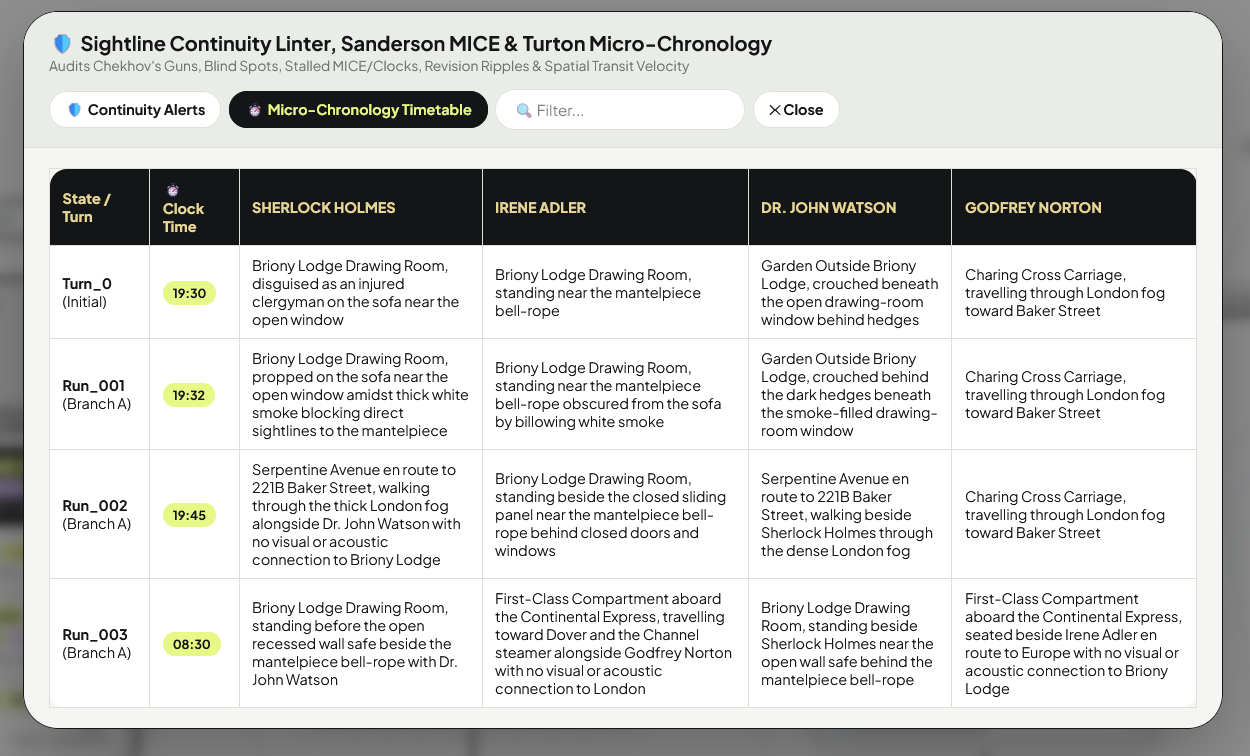
PRO⏱️ Stuart Turton's Micro-Chronology Timetable & Transit Velocity Check
HOWInside the Linter modal, click the
⏱️ Micro-Chronology Timetable tab to view a complete Character × Clock-Time Location Grid (23:40, 23:50, 00:00) across your timeline. If an active character jumps between opposite zones faster than the turn's elapsed clock time allows, the Linter flags 🏃 Impossible Transit Velocity.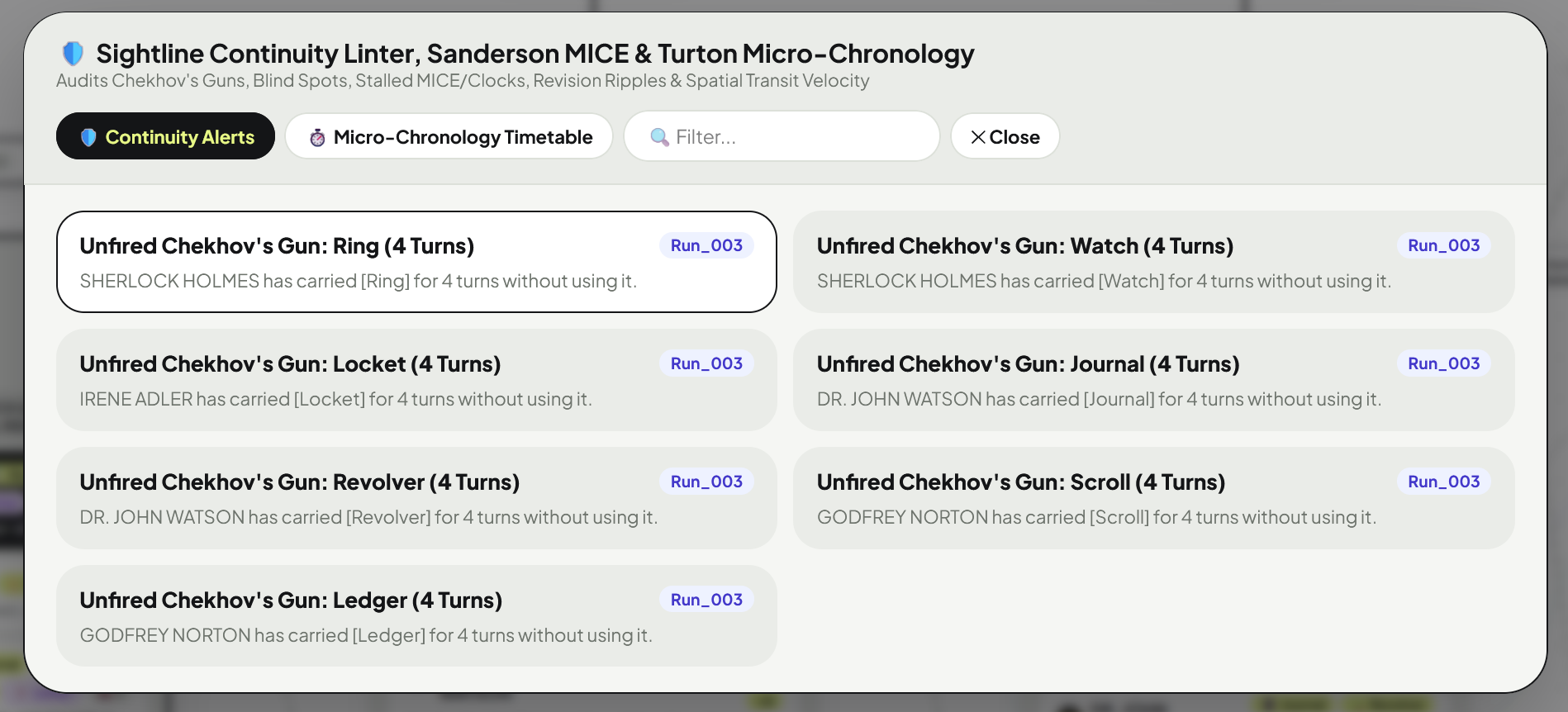
7. Story Insights, Voice Cadence Meter & Reverse-Causal Solver
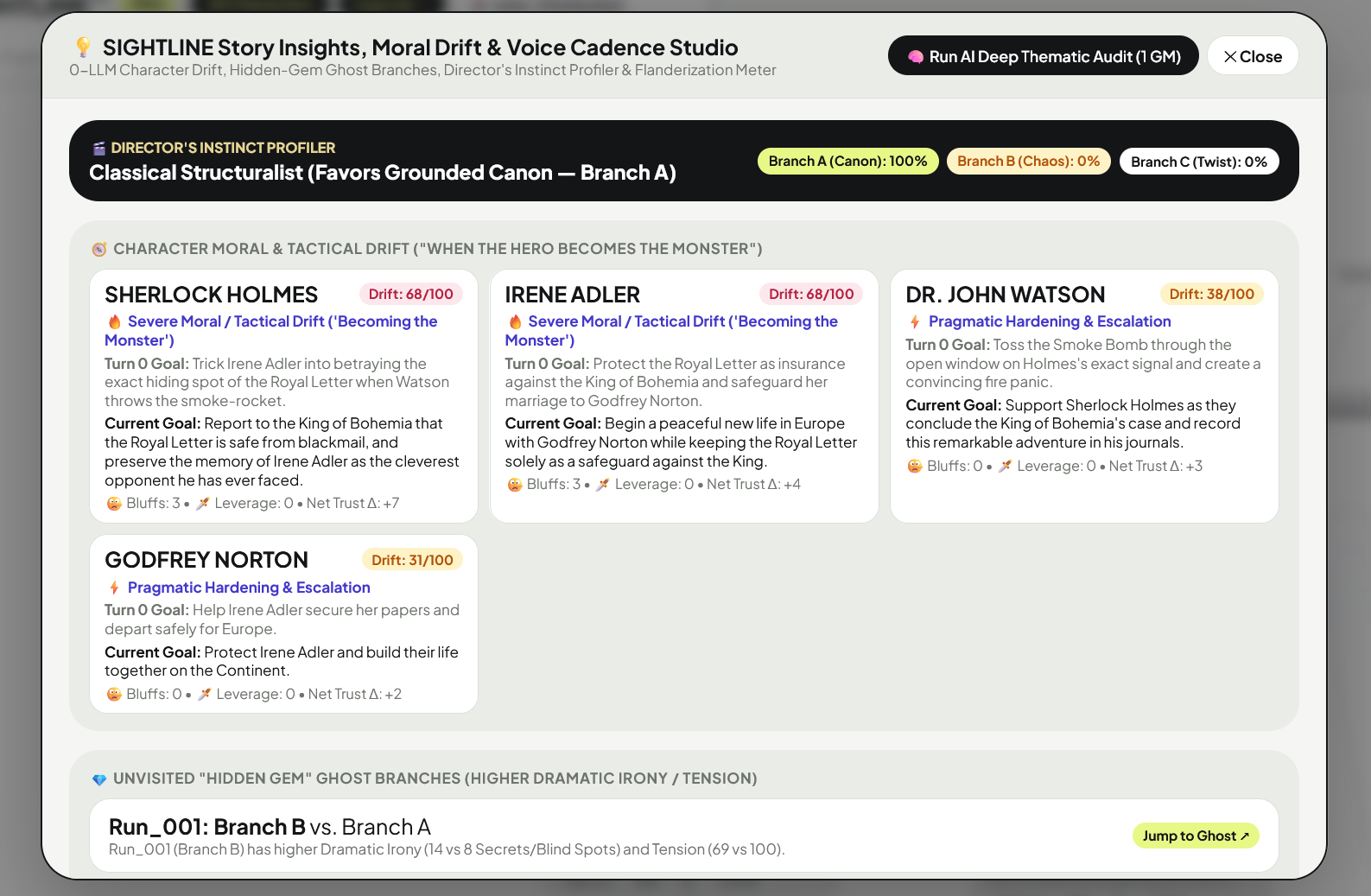
PRO💡 Story Insights, Moral Drift & 🗣️ 0-LLM Voice Cadence Meter (
💡 Icon)HOWClick
1. 🎬 Director's Instinct Profiler: Shows your branching bias across
2. 🧭 Character Moral & Tactical Drift ("When the Hero Becomes the Monster"): Compares each character's Turn 0 Core Motivation against their current motivation, bluffs used, leverage plays, and net trust shifts (
3. 💎 Unvisited "Hidden Gem" Ghost Branches: Highlights unvisited Ghost nodes that have higher Dramatic Irony (
4. 🗣️ 0-LLM Voice Cadence & Flanderization Meter: Computes each character's Avg. Sentence Length, Lexical Diversity (%), Contraction Rate (%), checks dialogue against
💡 Insights in the Top Bar or Left Rail to inspect 4 real-time analytics panels:1. 🎬 Director's Instinct Profiler: Shows your branching bias across
Branch A (Canon), Branch B (High Chaos), and Branch C (Strategic Twist).2. 🧭 Character Moral & Tactical Drift ("When the Hero Becomes the Monster"): Compares each character's Turn 0 Core Motivation against their current motivation, bluffs used, leverage plays, and net trust shifts (
0–100 Drift Score). Click 🧠 Run AI Deep Thematic Audit (1 GM) for a full psychological breakdown.3. 💎 Unvisited "Hidden Gem" Ghost Branches: Highlights unvisited Ghost nodes that have higher Dramatic Irony (
🔒 + 🙈) or Tension than your chosen branch.4. 🗣️ 0-LLM Voice Cadence & Flanderization Meter: Computes each character's Avg. Sentence Length, Lexical Diversity (%), Contraction Rate (%), checks dialogue against
Hard Never-Rules in Voice_Anchors.md, and warns if two characters' cadences start sounding identical.
PRO📌 Floating Idea Nodes & 🎯 Vince Gilligan's Reverse-Causal Bridge Solver (
📌 Icon)HOWClick
📌 on the Left Rail to pin untethered future destination beats onto your canvas (📌 Pin Floating Beat to Canvas). When you want to figure out how to get your characters from their current state to that future beat without plot contrivances, click 🎯 Solve Causal Bridge (1 GM) to compute 3 physically legal pathways (Path A / B / C) and load Step 1 straight into your Scene Nudge!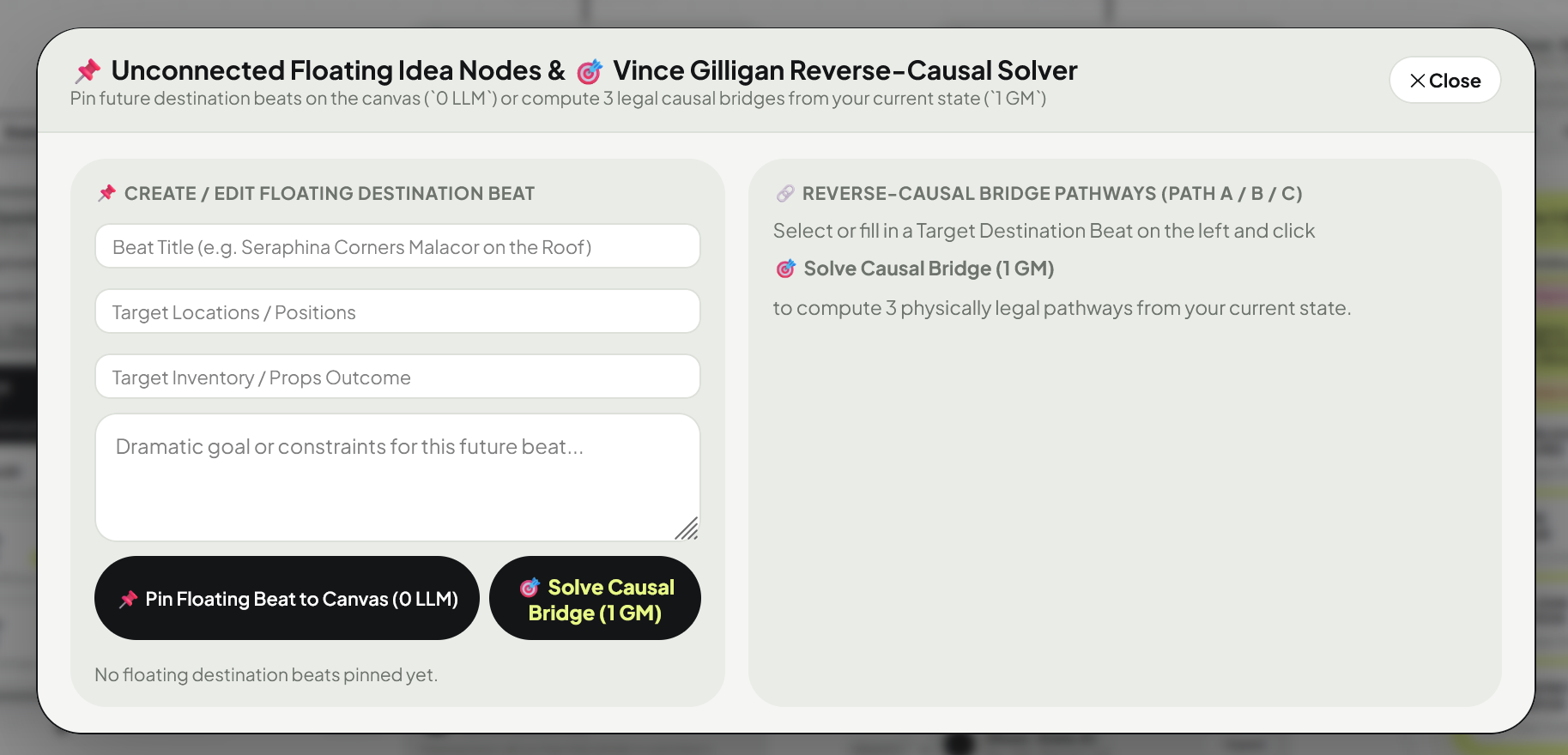
8. World Bible Lorebook, CoALA Archive & Salience Queue
WHATDeterministic Aho-Corasick Lorebook Studio (
▤ Icon)HOWClick
+ Add Lore Entry (or click any lore card to edit). Set the Title, comma-separated Trigger Keys, integer Priority, and check Constant if the law applies to every turn. Click 💾 Save Lore Entry to World_Bible.md (0 LLM).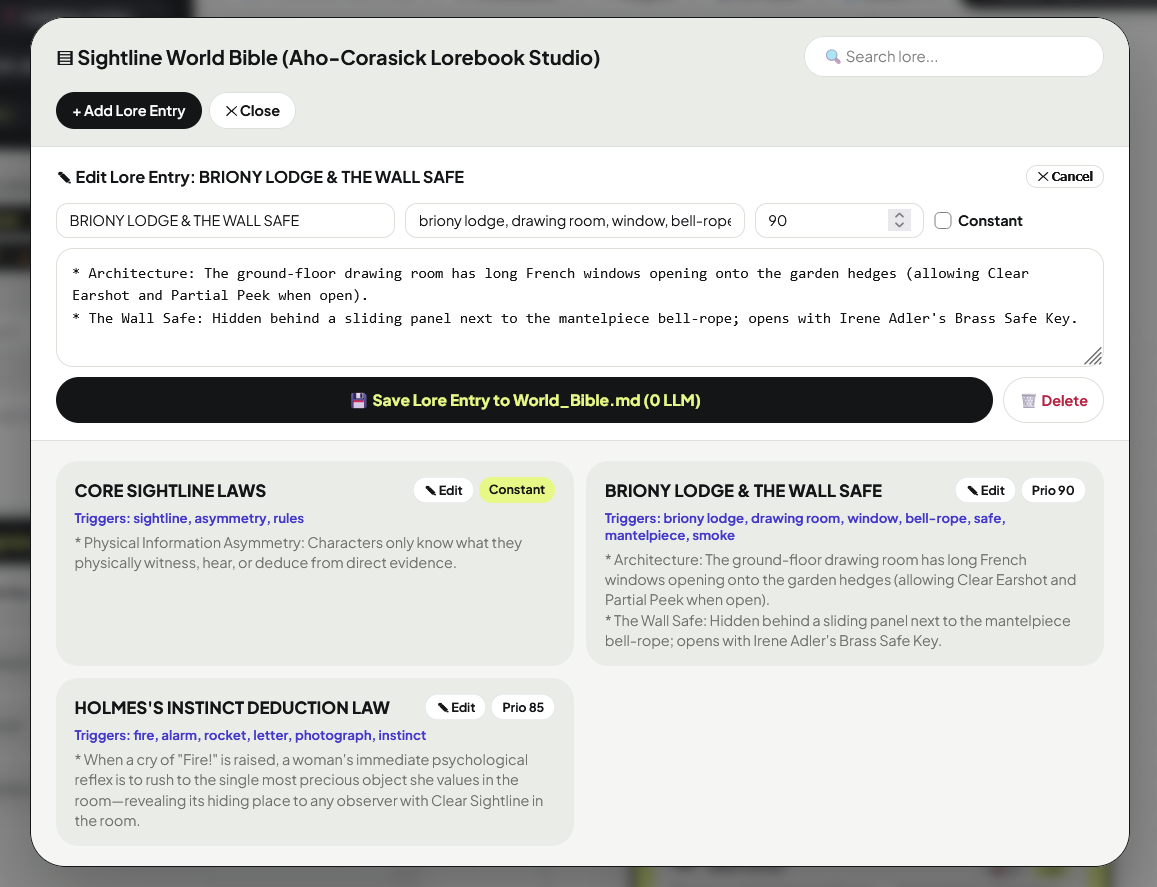
WHATCoALA Episodic Archive (
◈), 🔥 Hades Salience Impulse & State Directory (🗂️)HOWSIGHTLINE compacts older Private Knowledge into
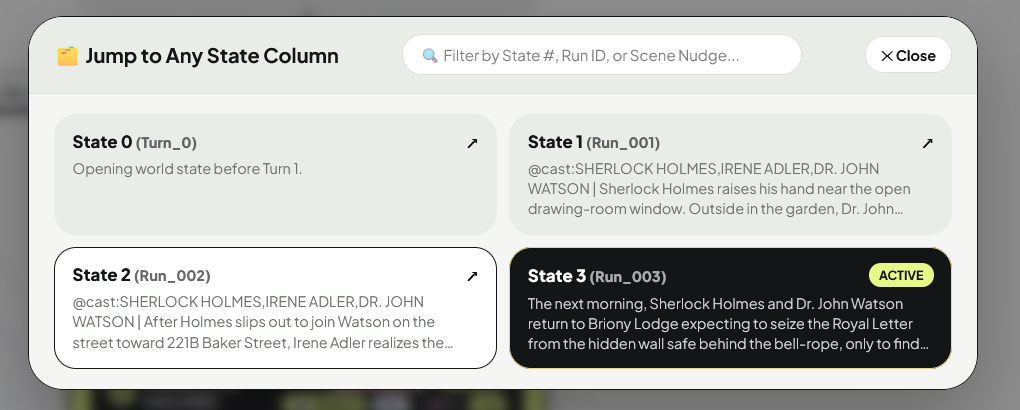
[Closed Paths/Constraints] in Episodic_Archive.json and scores every memory and trust/clock delta using Supergiant's (Hades) Reactive Salience Priority Queue—injecting the #1 highest-scoring unaddressed event as 🔥 TOP SALIENCE IMPULSE into the character's prompt. Use 🗂️ All States (N) ▾ in the Top Bar to jump to any State Column.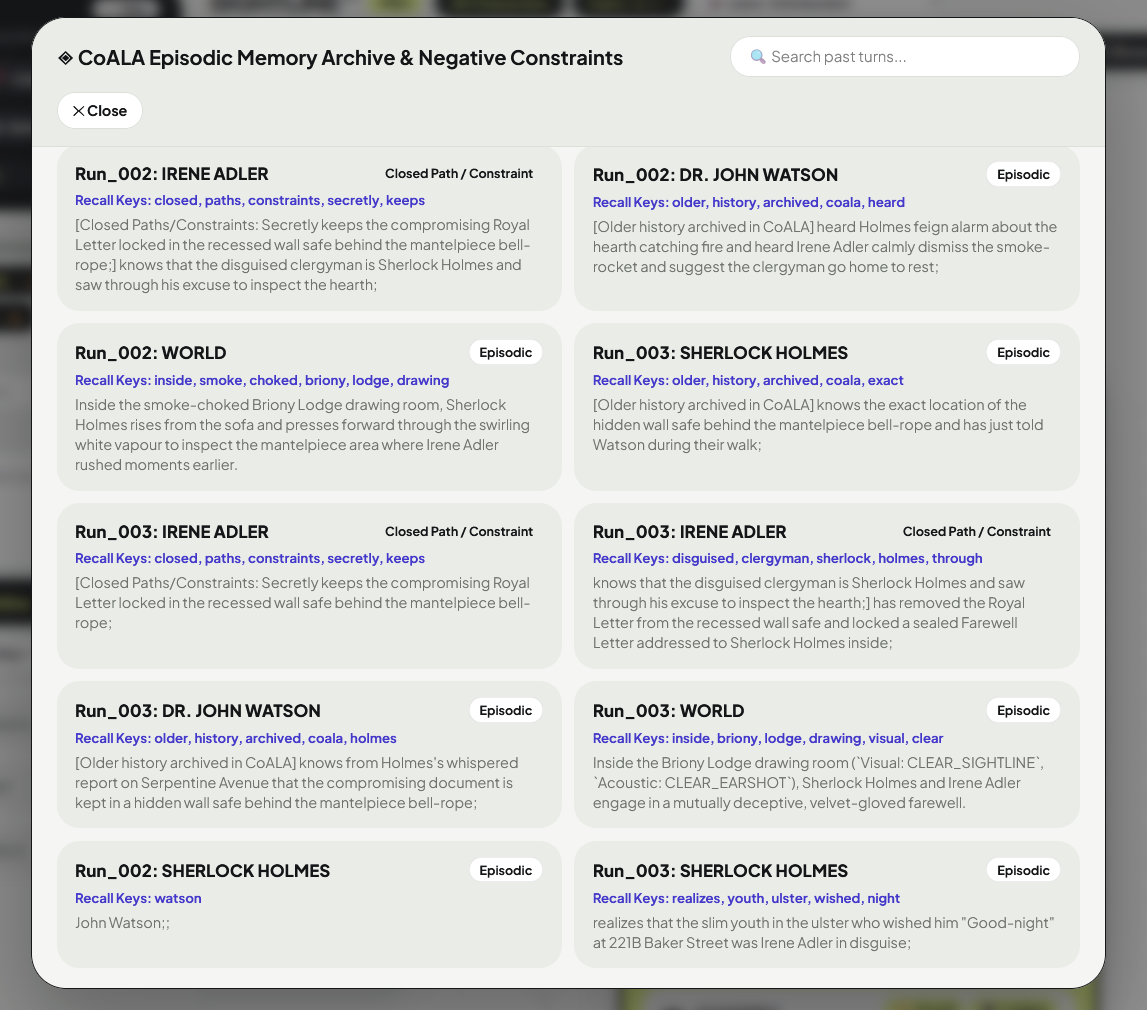
9. Cast Filter, Character Rename, Spawner & 2-Mode Delete
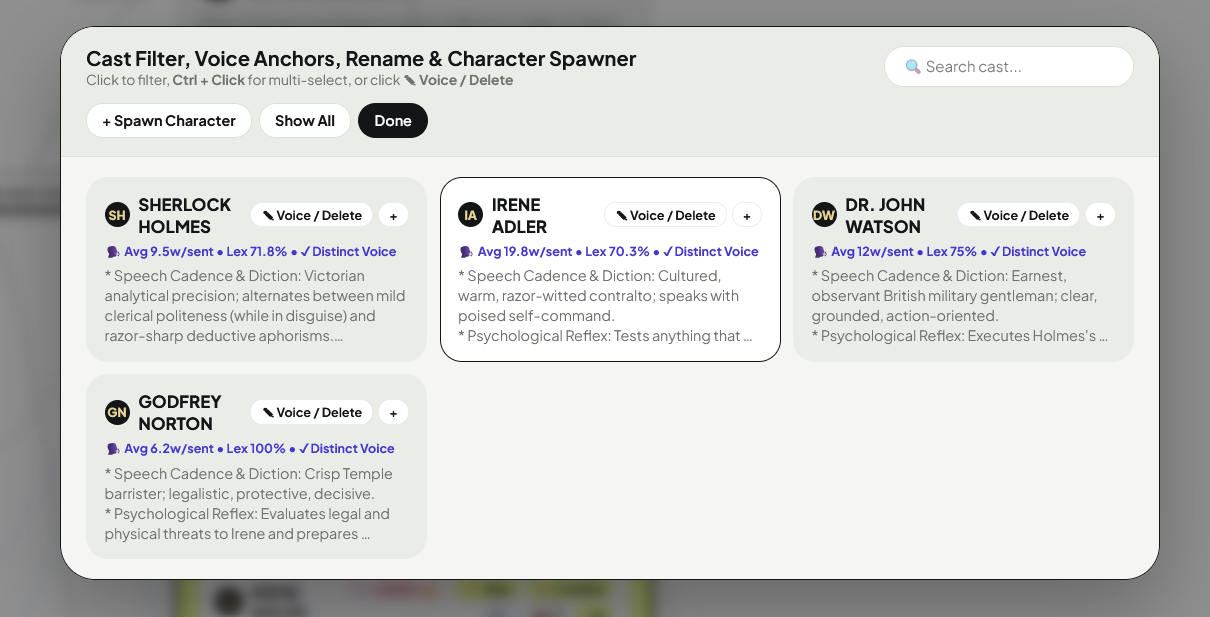
WHATMulti-Character Swimlane Filter, Rename, Spawner & 2-Mode Deletion (
Cast ▾ Button)HOW
• Filter Swimlanes: Click any character card to isolate their arc, or hold
• Rename or Edit Voice (
• 🗑️ 2-Mode Character Deletion PRO: Inside the
1. 🚪 Option A (Remove from Current State Forward): Removes the character from the active state forward (for character death or departure) while keeping all earlier turns intact.
2. 🔥 Option B (Purge Dummy Character from Entire Project): Atomically removes a test/dummy character across
• Spawn New Character (
Ctrl + Click (or click ✓ / +) to highlight multiple characters' swimlanes simultaneously.• Rename or Edit Voice (
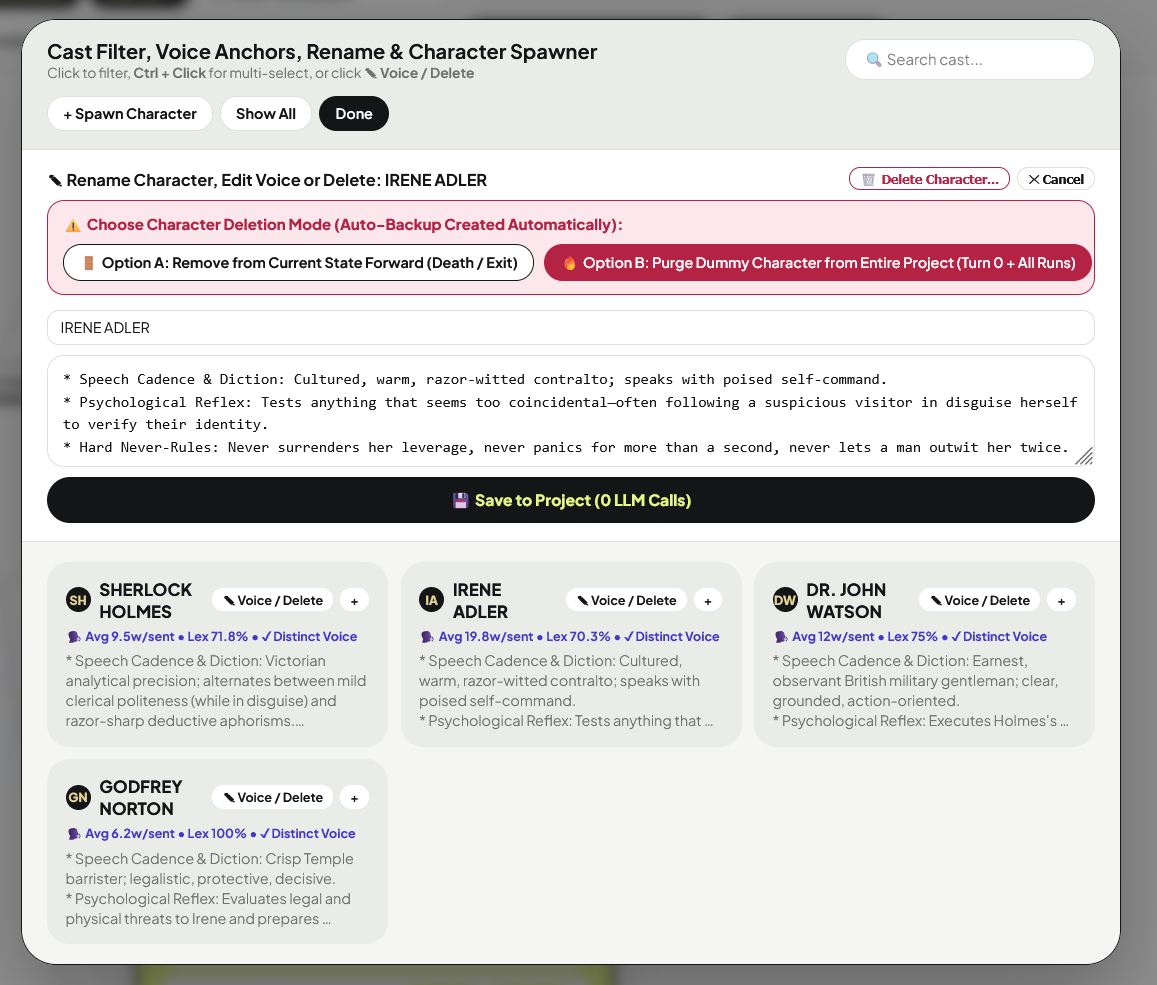
✎ Voice / Delete): Click ✎ Voice / Delete on any character card to rename them across the entire project or update their immutable Voice Anchor.• 🗑️ 2-Mode Character Deletion PRO: Inside the
✎ Voice / Delete drawer, click 🗑️ Delete Character... to choose between two safe options (with an automatic rolling backup created first):1. 🚪 Option A (Remove from Current State Forward): Removes the character from the active state forward (for character death or departure) while keeping all earlier turns intact.
2. 🔥 Option B (Purge Dummy Character from Entire Project): Atomically removes a test/dummy character across
Turn_0_Initial.md, all Run_XXX files, Voice_Anchors.md, and relationship edges in 0.0s.• Spawn New Character (
+ Spawn Character): Introduce new characters mid-book into the active state and Voice_Anchors.md with 0 LLM Calls.
10. Right Sightline Inspector — Tabs 1–3: Cascade Edits, Lie-Detector, Table-Read & Red-Team
TAB 1
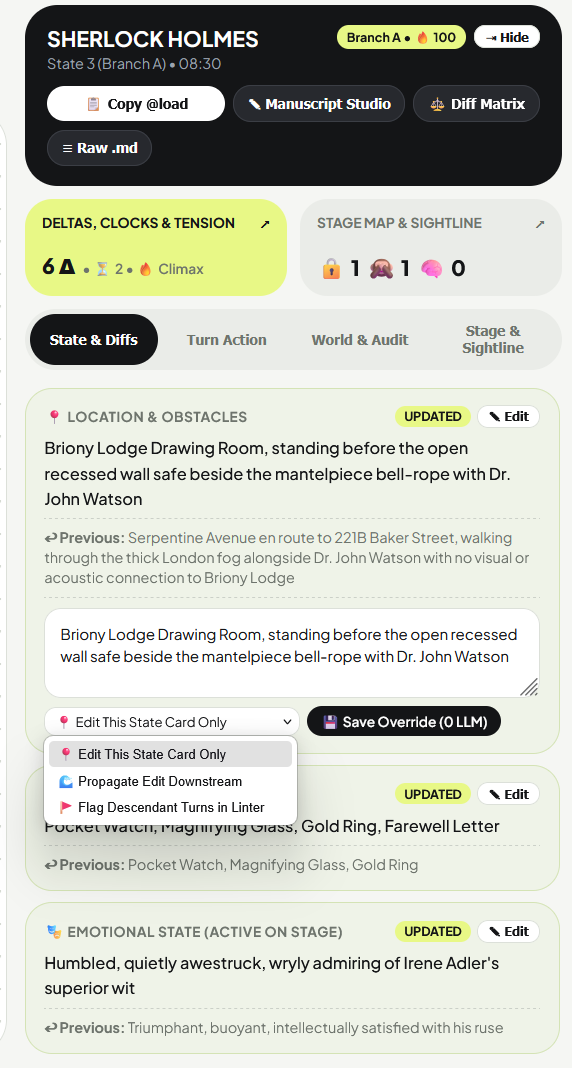
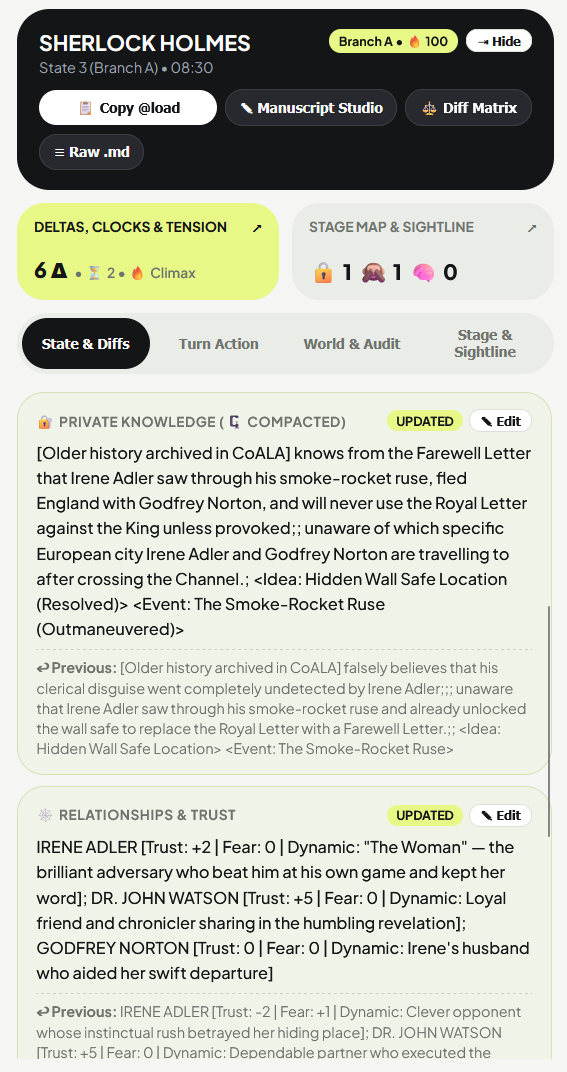
State & Diffs — 2nd-Order ToM Badges, Phantom Items & 🌊 Downstream Revision RippleHOWInspect Location, Inventory, Emotion, Private Knowledge (badged with
🧠 2nd-Order ToM when a character holds beliefs about another character's mind), Relationships, Core Motivation, and the Immutable Voice Anchor. Click ✎ Edit on any card to open the God-Mode inline editor and select your Downstream Revision Ripple Mode: 📍 Edit This State Card Only, 🌊 Propagate Edit Downstream (updates child turns automatically), or 🚩 Flag Descendant Turns in Linter.TAB 2
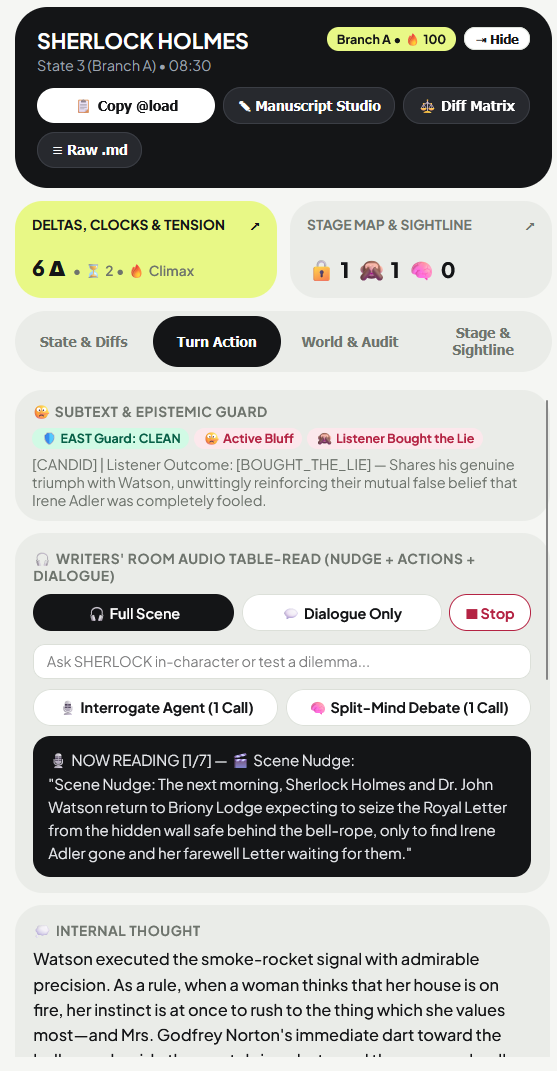
Turn Action — 🛡️ EAST Guard, 🤥 Subtext Lie-Detector, 🎧 Offline Table-Read & 🎙️ Interrogation / Split-MindHOW
• 🛡️ EAST Guard & 🤥 Subtext Lie-Detector: Badges every turn action with
• 🎧 Writers' Room Audio Table-Read: Click
• 🎙️ Interrogate Agent & 🧠 Split-Mind Debate: Type a question or dilemma and click
🛡️ EAST Guard: CLEAN / INTERCEPTED and classifies spoken dialogue into 🤥 Active Bluff, 🛡️ Deflection, 🗡️ Leverage Play, 🔇 Silent, or ✓ Candid—plus whether listeners in earshot 🙈 Bought the Lie or 👁️ Clocked the Tell.• 🎧 Writers' Room Audio Table-Read: Click
🎧 Full Scene (reads Scene Nudge + each active character's Action & Dialogue + Scene Outcome) or 💬 Dialogue Only. While a character speaks, their live caption appears and their monogram pulses on the 2D Stage Map! Click ⏹ Stop to halt audio instantly.• 🎙️ Interrogate Agent & 🧠 Split-Mind Debate: Type a question or dilemma and click
🎙️ Interrogate Agent to interview the character locked strictly inside their current epistemic state, or click 🧠 Split-Mind Debate to trigger a 3-voice Disco Elysium internal argument between their Core Motivation, Paranoia & Fear, and Voice Reflex!
TAB 3
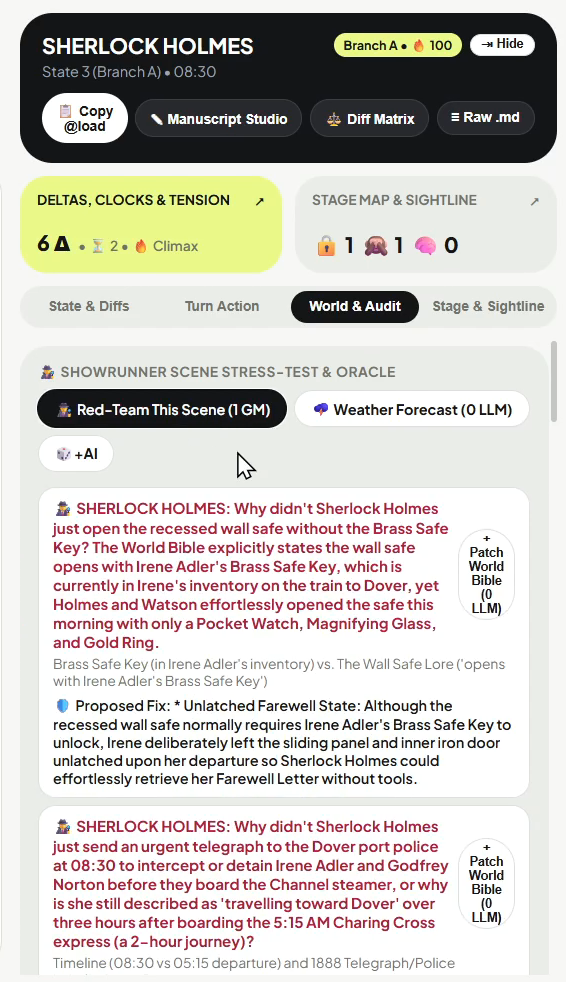
World & Audit — 🕵️ Red-Team This Scene, 🌩️ Weather Forecast Oracle, Clocks & CoT TraceHOW
• 🕵️ Red-Team This Scene (
• 🌩️ Weather Forecast Oracle (
1 GM Call): Challenges the current scene from the perspective of a skeptical beta-reader to find the top 3 "Why didn't Character X just...?" plot holes—each with a 1-click + Patch World Bible (0 LLM) button to seal the shortcut!• 🌩️ Weather Forecast Oracle (
0 LLM or 🎲+AI): Computes non-destructive Clock Detonation probabilities, active Convergence Zones, volatile Trust/Fear pairs, and optional 3-roll Monte Carlo lookahead trajectories.
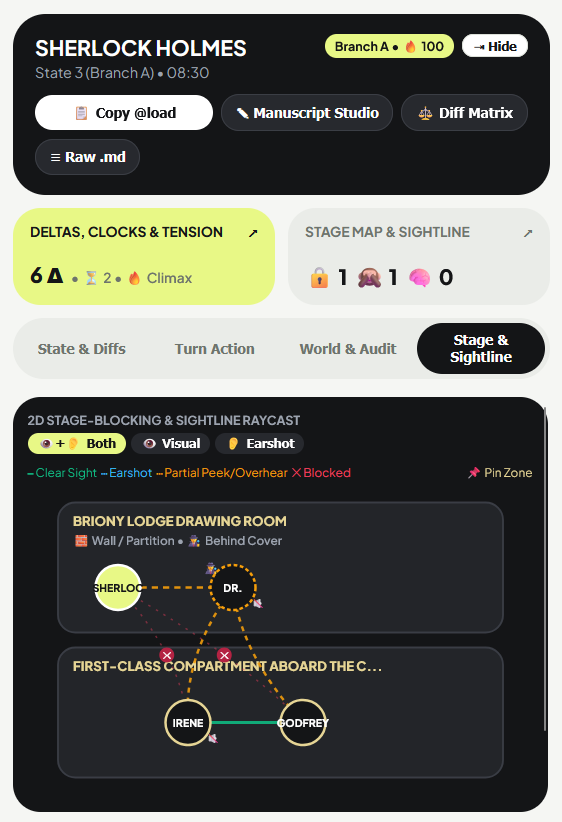
11. Right Sightline Inspector — Tab 4: Stage & Sightline (Dual Visual/Acoustic Map)
PRODual
👁️ Visual & 👂 Acoustic 2D Stage-Blocking Map, Custom Zone Pinning & Social DominoesHOW
• Dual Sensory Channels: Toggle between
• 📌 Pin Zone: Click
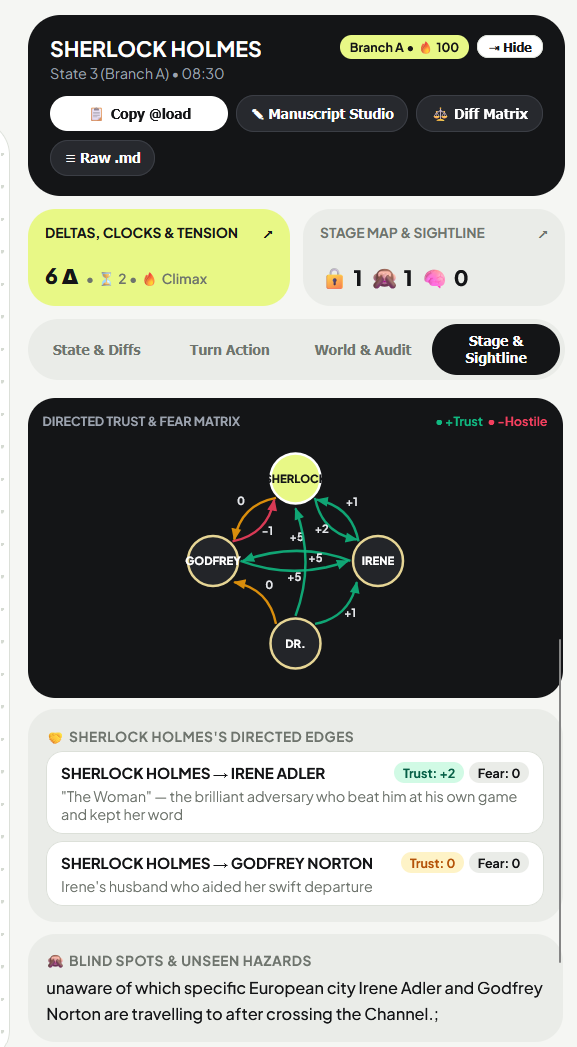
• 🌊 2nd-Order Cascading Social Dominoes: When Character C witnesses Character A betraying or attacking Character C's ally B, SIGHTLINE automatically computes and displays the 2nd-order social ripple card right below the Directed Trust & Fear Matrix SVG.
👁️+👂 Both, 👁️ Visual, and 👂 Earshot at the top of the 2D Stage Map:
━ Clear Sight (Green) for unobstructed same-room line of sight,
┅ Clear Earshot (Blue Dashed) for audio range,
┅ Partial Peek / Overhear (Amber Dashed) across an ajar door, partition, or air vent, and
✕ Blocked (Red) for separated zones. Characters who took silent actions without speaking display a 🔇 badge.• 📌 Pin Zone: Click
📌 Pin Zone to manually assign or lock a character's room name in stage_layout.json.• 🌊 2nd-Order Cascading Social Dominoes: When Character C witnesses Character A betraying or attacking Character C's ally B, SIGHTLINE automatically computes and displays the 2nd-order social ripple card right below the Directed Trust & Fear Matrix SVG.
12. AI Model Selection, Live API Stats & Zero-Leak Security Architecture
WHYAsymmetric Model Routing (
Char Model vs. GM Model) — Saves 65–80% on API Costs
• Character Agent Model (
• Continuity Auditor & Showrunner Model (
Char Model): Runs once per active character on stage (~150 tokens output). Use fast, low-cost models (gpt-4o-mini, claude-3-5-haiku, gemini-2.5-flash, qwen/qwen3.8-27b, or local llama3.1:8b).• Continuity Auditor & Showrunner Model (
GM Model): Runs once per turn to adjudicate sightline collisions, write Branch A / B / C, and power opt-in Showrunner tools (Red-Team, Reverse-Causal Solver, Retro-Con). Use your strongest reasoning model here (openai/gpt-oss-120b, gpt-4o, claude-3-7-sonnet, gemini-2.5-pro).
SETUP GUIDE🔌 Step-by-Step: Cloud BYOK (Bring Your Own Key) vs. $0 Local AI (Ollama / LM Studio)
1. What is BYOK (Bring Your Own Key)?
Instead of paying a $30/month cloud subscription markup, SIGHTLINE™ connects directly from your computer to your chosen AI provider at wholesale cost (often fractions of a cent per turn—or $0.00 on Free API Tiers).
• How to Set Up Cloud BYOK in 60 Seconds:
1. Open the Left Sightline Console (
2. Pick your Provider from the dropdown:
–
–
–
–
3. Paste your API key into the LLM API Key box, click
2. How to Run 100% Free & Offline on Your Own Computer (
If your PC or Mac has 8GB+ of RAM/VRAM, you can run AI models locally at $0.00 cost forever with zero internet connection:
• Option A — Using Ollama (Recommended):
1. Download and install Ollama from
2. Open your terminal/command prompt and run:
3. In SIGHTLINE™, open
• Option B — Using LM Studio:
1. Download LM Studio from
2. In SIGHTLINE™, select
Instead of paying a $30/month cloud subscription markup, SIGHTLINE™ connects directly from your computer to your chosen AI provider at wholesale cost (often fractions of a cent per turn—or $0.00 on Free API Tiers).
• How to Set Up Cloud BYOK in 60 Seconds:
1. Open the Left Sightline Console (
▶) and click 🎛️ AI Provider & Asymmetric Models.2. Pick your Provider from the dropdown:
–
OpenAI Compatible (Groq / OpenRouter / DeepSeek): For Groq (fast & free tier available at console.groq.com/keys), keep Base URL as https://api.groq.com/openai/v1, set Char Model to qwen/qwen3.8-27b (or llama-3.3-70b-versatile) and GM Model to openai/gpt-oss-120b. For OpenRouter (openrouter.ai/keys), set Base URL to https://openrouter.ai/api/v1.–
Gemini (Google AI Studio — Free Tier Available): Get a key at aistudio.google.com/apikey. Base URL auto-fills to Google's endpoint; set Char Model to gemini-2.5-flash and GM Model to gemini-2.5-pro.–
OpenAI: Get a key at platform.openai.com/api-keys. Set Char Model to gpt-4o-mini and GM Model to gpt-4o.–
Anthropic: Get a key at console.anthropic.com. Set Char Model to claude-3-5-haiku-latest and GM Model to claude-3-7-sonnet-latest.3. Paste your API key into the LLM API Key box, click
💾 Save AI Config (0 LLM), and click 🔌 Test AI Connection to verify!2. How to Run 100% Free & Offline on Your Own Computer (
Local Mode):If your PC or Mac has 8GB+ of RAM/VRAM, you can run AI models locally at $0.00 cost forever with zero internet connection:
• Option A — Using Ollama (Recommended):
1. Download and install Ollama from
ollama.com.2. Open your terminal/command prompt and run:
ollama run llama3.1:8b (or ollama run qwen2.5:14b).3. In SIGHTLINE™, open
🎛️ AI Provider & Asymmetric Models, select Local, keep Base URL as http://127.0.0.1:11434/v1, type llama3.1:8b in both the Char Model and GM Model boxes (leave API Key blank), click 💾 Save AI Config, and click 🔌 Test AI Connection!• Option B — Using LM Studio:
1. Download LM Studio from
lmstudio.ai, download any model, and start the Local Server on port 1234.2. In SIGHTLINE™, select
Local, set Base URL to http://127.0.0.1:1234/v1, enter your loaded model's name, and click 💾 Save AI Config.
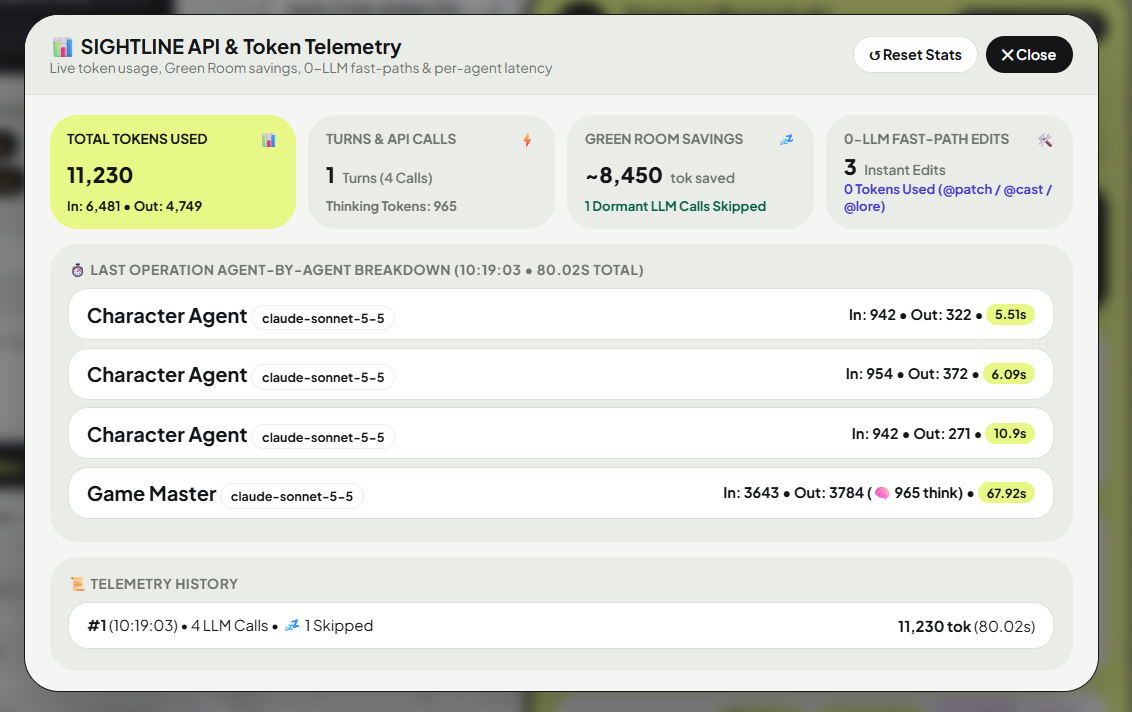
STATSLive
📊 API Stats Dashboard & 🔒 Zero-Leak API Key Isolation
•
• 🔒 Zero-Leak API Key Privacy: SIGHTLINE stores your secret API key exclusively in your local OS user profile (
📊 API Stats Button (Top Bar): Inspect exact Input, Output, and Thinking token counts, per-agent latency, 💤 Green Room token savings, and 🛠️ 0-LLM Fast-Path edits.• 🔒 Zero-Leak API Key Privacy: SIGHTLINE stores your secret API key exclusively in your local OS user profile (
~/.sightline_secret_key.json)—never inside your book project folder, Story_Flowchart.html, or 📦 Export .zip archives. You can share project folders and Time-Capsule HTML files with editors with 0% risk of exposing your API key.
LICENSE🔑 License Activation, 14-Day Offline Writing Lease & 1-Click PC Seat Transfer
• Buy Once, Own Forever (Zero Subscriptions): Your SIGHTLINE™ license unlocks the native desktop studio permanently on your activated machine(s).
• ✈️ 14-Day Offline Writing Lease: Once activated, SIGHTLINE™ binds a cryptographic hardware token to your computer—allowing you to work 100% offline on flights, trains, or writing retreats for up to 14 days at a time without needing an internet connection. Simply open SIGHTLINE™ while connected to Wi-Fi once every two weeks to automatically refresh your offline lease.
• 🔄 How to Transfer Your License to Another PC or Mac (1-Click Deactivation):
1. Open the Left Sightline Console (
2. Click the
3. Click OK on the confirmation prompt ("Deactivate SIGHTLINE license on this computer so you can move it to another device?"). Your current PC will immediately deactivate and free up your seat.
4. Launch SIGHTLINE™ on your new computer and enter your License Key to unlock it.
• 👥 Teams (5-Seat) & Enterprise (20+ Seat) Licenses: On multi-seat licenses, deactivating one computer only releases that single machine's seat slot without affecting your other teammates' active installations.
• ✈️ 14-Day Offline Writing Lease: Once activated, SIGHTLINE™ binds a cryptographic hardware token to your computer—allowing you to work 100% offline on flights, trains, or writing retreats for up to 14 days at a time without needing an internet connection. Simply open SIGHTLINE™ while connected to Wi-Fi once every two weeks to automatically refresh your offline lease.
• 🔄 How to Transfer Your License to Another PC or Mac (1-Click Deactivation):
1. Open the Left Sightline Console (
▶) on your current computer and scroll to the bottom footer.2. Click the
🔑 [Your Name] • SIGHTLINE™ © 2026 Nikhil Bhardwaj license badge at the bottom of the drawer (requires an active internet connection so Lemon Squeezy can release your seat).3. Click OK on the confirmation prompt ("Deactivate SIGHTLINE license on this computer so you can move it to another device?"). Your current PC will immediately deactivate and free up your seat.
4. Launch SIGHTLINE™ on your new computer and enter your License Key to unlock it.
• 👥 Teams (5-Seat) & Enterprise (20+ Seat) Licenses: On multi-seat licenses, deactivating one computer only releases that single machine's seat slot without affecting your other teammates' active installations.
FAQ❓ Frequently Asked Workflow Questions
• Q: Why did a dashed Ghost Card (
A: Whenever you time-travel to (
• Q: Does Turn 50 cost more tokens than Turn 1?
A: No! Unlike standard AI chat tools that re-send your entire 50-turn history on every click, SIGHTLINE™ only sends the single current state snapshot (~700 tokens) plus triggered lore. Turn 100 costs the exact same tiny input tokens as Turn 1.
• Q: Can I use SIGHTLINE™ 100% free with zero API costs?
A: Yes. Switch the AI Provider dropdown to
• Q: Where are my story files and API keys saved?
A: All state cards, World Bible lore, Voice Anchors, and manuscript drafts are saved as clean Markdown and JSON directly inside your chosen project folder on your hard drive. Your secret API key is isolated in your local OS user profile (
Branch B or C) turn into a solid card?A: Whenever you time-travel to (
📌 Branch Selected), edit (✎ Edit), or merge a Ghost branch, SIGHTLINE™ permanently promotes it into a Canon State Card so you never lose a branch you worked on—even when Ghost branches are hidden.• Q: Does Turn 50 cost more tokens than Turn 1?
A: No! Unlike standard AI chat tools that re-send your entire 50-turn history on every click, SIGHTLINE™ only sends the single current state snapshot (~700 tokens) plus triggered lore. Turn 100 costs the exact same tiny input tokens as Turn 1.
• Q: Can I use SIGHTLINE™ 100% free with zero API costs?
A: Yes. Switch the AI Provider dropdown to
Local to run local models via Ollama or LM Studio at $0.00 cost, or use free-tier API keys from Groq, Google Gemini AI Studio, or OpenRouter.• Q: Where are my story files and API keys saved?
A: All state cards, World Bible lore, Voice Anchors, and manuscript drafts are saved as clean Markdown and JSON directly inside your chosen project folder on your hard drive. Your secret API key is isolated in your local OS user profile (
~/.sightline_secret_key.json) so exporting a project .zip never leaks your API key.
13. Frequently Asked Questions & Showrunner Troubleshooting Guide
CANVAS & TIMELINESMultiverse Branching, Ghost Cards & Navigation
• Q: Why did a dashed Ghost Card (
A: Every turn generates 3 outcomes:
• Q: What is the difference between
A:
• Q: How do I isolate just 1 or 2 characters' swimlane threads on a busy canvas?
A: Click
• Q: How do I track a custom MacGuffin or prop that isn't in the default icon list?
A: Type any comma-separated item names into the Top Bar search box (
Branch B or Branch C) turn into a solid card?A: Every turn generates 3 outcomes:
Branch A (Canon) and two dashed Ghost Cards (Branch B: High Chaos and Branch C: Strategic Twist). The moment you time-travel to a Ghost Card (📌 Branch Selected), edit it (✎ Edit), or merge it (⑂), SIGHTLINE™ permanently promotes it into a solid Canon State Card so you never lose a timeline you worked on—even when you click ◌ to hide untouched Ghost branches.• Q: What is the difference between
📌 Branch Selected and 📍 Continue Active in the Left Console?A:
📍 Continue Active always advances the story from your Acid-Lime YOU ARE HERE card. 📌 Branch Selected lets you click any historical card or Ghost node on the canvas and spawn a brand-new timeline branch from that exact point in time.• Q: How do I isolate just 1 or 2 characters' swimlane threads on a busy canvas?
A: Click
Cast (N) ▾ in the Top Bar. Click a character card to solo their swimlane, or hold Ctrl + Click (or click the + / ✓ badge) to highlight multiple characters' colored cubic-Bézier threads simultaneously.• Q: How do I track a custom MacGuffin or prop that isn't in the default icon list?
A: Type any comma-separated item names into the Top Bar search box (
🔍 + Track Item: Key, Ledger...). SIGHTLINE™ immediately scans all character inventories across every turn and badges those items with live pills.
SIGHTLINES & PHYSICSInformation Asymmetry, Blind Spots, Green Room & 2D Stage Blocking
• Q: How do I make sure a character DOES NOT know a secret so SIGHTLINE™ tracks it as a Blind Spot (
A: In a character's
• Q: How do I hide a secret trap or twist from ALL characters so only the Continuity Auditor (GM) knows about it?
A: In
• Q: What happens when I uncheck a character into the Dormant Green Room (
A: Unchecked characters stay off-screen in the Green Room, consuming
• Q: What do the 4 colored raycast lines on the 2D Stage Map (Tab 4) mean?
A: ━ Solid Green (Clear Sight) = Same zone with unobstructed visual line-of-sight. ┅ Dashed Blue (Clear Earshot) = Full audio earshot. ┅ Dashed Amber (Partial Peek / Overhear) = Peering or overhearing across an ajar door, partition, or air vent. ✕ Red Marker (Blocked) = Physically separated zones with zero sensory access.
🙈)?A: In a character's
Private Knowledge field (or via God-Mode ✎ Edit), phrase unknown facts or false beliefs using explicit epistemic cues such as "unaware that...", "does not know...", "falsely believes...", or "assumes that...". SIGHTLINE™ automatically routes those clauses into 🙈 Blind Spots, shields them via the 🛡️ Pre-GM EAST Guard, and enforces them in the Manuscript Studio.• Q: How do I hide a secret trap or twist from ALL characters so only the Continuity Auditor (GM) knows about it?
A: In
=== GLOBAL WORLD FACTS ===, prefix the line with * [HIDDEN GM_ONLY]: ... (for example: * [HIDDEN GM_ONLY]: Victor wired an explosive charge under the floorbolt). SIGHTLINE™ physically strips [HIDDEN GM_ONLY] lines from all Character Agent prompts while keeping them visible to the GM Auditor!• Q: What happens when I uncheck a character into the Dormant Green Room (
💤)?A: Unchecked characters stay off-screen in the Green Room, consuming
0 LLM calls and 0 tokens. Their state blocks are sliced out of active character prompts so active characters cannot meta-game. However, the GM receives a 1-line digest of their location and traps—so if an active scene makes loud noise near a dormant character's room, the GM automatically emits a +💤Δ ripple update for them.• Q: What do the 4 colored raycast lines on the 2D Stage Map (Tab 4) mean?
A: ━ Solid Green (Clear Sight) = Same zone with unobstructed visual line-of-sight. ┅ Dashed Blue (Clear Earshot) = Full audio earshot. ┅ Dashed Amber (Partial Peek / Overhear) = Peering or overhearing across an ajar door, partition, or air vent. ✕ Red Marker (Blocked) = Physically separated zones with zero sensory access.
PRO STUDIO TOOLSRashomon Lens, Manuscript Studio, Retro-Con, Reverse-Causal Solver & Audio Table-Read
• Q: What does the
A: Selecting any character enters their subjective epistemic reality in
• Q: What if I improvise a new detail while writing prose in the Manuscript Studio (e.g., a character drops an item or reveals a secret)?
A: Click
• Q: How do I create a
A: Click the
• Q: What does
A: It uses 100% free, offline system speech synthesis (
• Q: When I use God-Mode
A:
• Q: What is the difference between Option A and Option B when deleting a character in
A: Option A (Remove from Current State Forward) removes the character from the active state forward (ideal when a character dies or leaves the story mid-book while preserving their history in earlier turns). Option B (Purge Dummy Character from Entire Project) atomically removes a test/placeholder character across
👁️ Lens: Omniscient ▾ (Rashomon Filter) dropdown in the Top Bar do?A: Selecting any character enters their subjective epistemic reality in
0.0s (0 LLM Calls): turns where they were 💤 Dormant dim on the canvas, characters in ✕ Blocked rooms become ? UNKNOWN on the 2D Stage Map, other characters' secrets are redacted, and stolen items they still think they hold appear as Violet Phantom Pills (👻).• Q: What if I improvise a new detail while writing prose in the Manuscript Studio (e.g., a character drops an item or reveals a secret)?
A: Click
🔄 Retro-Con Sync to State (1 GM) in the Manuscript Studio toolbar. SIGHTLINE™ compares your drafted prose against the State Card, extracts any new state changes you improvised, and lets you patch them back into the State Card in 1 click!• Q: How do I create a
📌 Floating Beat and use 🎯 Vince Gilligan's Reverse-Causal Solver?A: Click the
📌 icon on the Left Rail (below the 🔥 flame icon). Enter your future destination scene's Title, Target Locations, and Target Inventory, then click 📌 Pin Floating Beat to Canvas (0 LLM). Whenever you want to bridge your characters from their current state to that future scene, click 🎯 Solve Causal Bridge (1 GM) to generate 3 physically legal pathways (Path A / B / C).• Q: What does
🎧 Table-Read Scene read out loud, and does it cost any API tokens?A: It uses 100% free, offline system speech synthesis (
$0.00 token cost). 🎧 Full Scene reads the Scene Nudge, each active character's Intended Action and Spoken Dialogue (while pulsing their monogram on the 2D Stage Map), and the Scene Outcome. 💬 Dialogue Only reads strictly the spoken dialogue lines. Click ⏹ Stop to halt audio instantly.• Q: When I use God-Mode
✎ Edit on an earlier turn, what do the Ripple options do?A:
📍 Edit This State Card Only updates only that single card. 🌊 Propagate Edit Downstream automatically updates that field across all child turns descending from that card. 🚩 Flag Descendant Turns in Linter marks child turns in the Continuity Linter so you can review them manually.• Q: What is the difference between Option A and Option B when deleting a character in
Cast ▾?A: Option A (Remove from Current State Forward) removes the character from the active state forward (ideal when a character dies or leaves the story mid-book while preserving their history in earlier turns). Option B (Purge Dummy Character from Entire Project) atomically removes a test/placeholder character across
Turn_0, all Run_XXX files, and Voice_Anchors.md. Both modes create an automatic backup in /backups first.
COST, PRIVACY & LICENSEToken Savings, Free Local AI (Ollama / LM Studio), Zero-Leak Privacy & Seat Transfer
• Q: Does Turn 50 or Turn 100 cost more API tokens than Turn 1?
A: No! Standard AI chat tools re-send your entire 50-turn history on every message (ballooning to 50,000+ tokens per click). SIGHTLINE™ is a Markov State Machine that only sends the single current state snapshot (~700 tokens) plus triggered lore capped by your Lore Token Budget (default 600 tokens). Turn 100 costs the exact same tiny input tokens as Turn 1!
• Q: Can I run SIGHTLINE™ 100% free with zero API costs?
A: Yes! Open
• Q: Where are my manuscript files and API keys stored? Is it safe to share a
A: 100% of your story files (
• Q: How do I transfer my SIGHTLINE™ license to a new computer?
A: Open the Left Console (
A: No! Standard AI chat tools re-send your entire 50-turn history on every message (ballooning to 50,000+ tokens per click). SIGHTLINE™ is a Markov State Machine that only sends the single current state snapshot (~700 tokens) plus triggered lore capped by your Lore Token Budget (default 600 tokens). Turn 100 costs the exact same tiny input tokens as Turn 1!
• Q: Can I run SIGHTLINE™ 100% free with zero API costs?
A: Yes! Open
🎛️ AI Provider & Asymmetric Models in the Left Console and set Provider to Local to run local models on your own PC/Mac via Ollama (http://127.0.0.1:11434/v1) or LM Studio (http://127.0.0.1:1234/v1) at $0.00 cost, or use free-tier API keys from Groq, Google AI Studio, or OpenRouter.• Q: Where are my manuscript files and API keys stored? Is it safe to share a
📦 Export .zip file?A: 100% of your story files (
.md and .json) stay on your local hard drive inside your project folder. Your secret API key is isolated in your OS user profile (~/.sightline_secret_key.json) and is never written into your project folder, Story_Flowchart.html, or .zip exports—making project .zip files and HTML Time-Capsules 100% safe to share with editors or collaborators.• Q: How do I transfer my SIGHTLINE™ license to a new computer?
A: Open the Left Console (
▶), scroll to the bottom footer, and click 🔑 [Your Name] • SIGHTLINE™. Click 🔓 Deactivate This PC in the popup modal to release your seat, then enter your License Key on your new computer.
STUDIO UTILITIES🌙 Night Mode, 🔌 Test AI, ⏪ 1-Click Undo / Restore, 📂 Open Folder & ⌨️ Shortcuts
• 🌙 Night Mode / ☀️ Daylight Toggle: Click
• 🔌 Test AI Connection: Inside
• ⏪ Undo Last Turn & 🕰️ Restore Backup: Inside
• 📂 Open Current Folder in Explorer: Click
• ⌨️ Keyboard Shortcuts: Press
• 🔔 Studio Hub, Updates & 💬 Feedback: Click
🌙 Night at the bottom of the Left Console to switch the canvas and cards into a dark-slate night-writing theme.• 🔌 Test AI Connection: Inside
🎛️ AI Provider & Asymmetric Models, click 🔌 Test AI Connection to verify your API key and model name with a 0.4s ping before running a turn.• ⏪ Undo Last Turn & 🕰️ Restore Backup: Inside
📂 Project Switcher, click ⏪ Undo Last Turn to roll back the latest Run_XXX state, or click 🕰️ Restore Backup to restore the most recent snapshot from /backups.• 📂 Open Current Folder in Explorer: Click
📂 Open Current Folder in Explorer inside Project Switcher to open your active book folder in Windows File Explorer or macOS Finder.• ⌨️ Keyboard Shortcuts: Press
Esc to close any open modal window, Ctrl + Enter inside the Scene Nudge box to run a turn, or Ctrl + S inside the Manuscript Studio to save to disk.• 🔔 Studio Hub, Updates & 💬 Feedback: Click
🔔 Hub to check for updates and review your 100% Author IP Ownership EULA, or click 💬 Feedback to send a Bug Report or Feature Request.